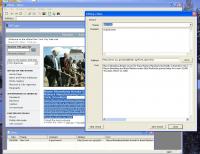
- you can open and hold a lot of Internet Sites together;
- you can select a texts from any Internet Pages and save it to a realy MS Access Database as your Notes;
- every Note has a Date, Theme, Internet-address, Comment and Text fields;
- you can open and hold a lot of Internet Sites together;
- you can select a texts from any Internet Pages and save it to a realy MS Access Database as your Notes;
- every Note has a Date, Theme, Internet-address, Comment and Text fields;
- you can find all Notes in the Database by a part of phrase.
- you can add a "Theme" for every Note and than group the Notes by that Theme;
- you can see your Notes as a Table and sort them by Date, Theme, Internet-address, Comment or Text;
- no limits for a size of selected texts and a size of your Comments;
- no limits for amount of your Notes (million and more)
- simply and friendly user interface;
How to use it:
- Use a Favorite Menu or Address Line for open an Internet Site in a current Window.
- Press a "New" button (or Menu File/New) to open a new Window.
- Use Menu Window/Tile to place all opened Windows tiled.
Notes and Database:
- Select a text on a Webpage and copy it to Clippboard (Menu Edit/Copy).
- Press "Save copied Text to a Database" button.
- In an "Adding a new Note" Dialog enter a new Theme or choose the earlier entered theme for that Text.
- Enter a Comment for that Text if you need.
- Press "Save Record" button.
- The new Record with a Fields "Date", "Theme", "Comment" and "Text" will be added to a Database. Whats new in version 2.0: No changes Operating system: Win98,WinME,Windows2000,WinXP,Windows2003,Windows Vista Business Release notes: New Release
ZAC Browser - First web browser developed specifically for children with autism, and autism spectrum disorders such as Asperger syndrome, pervasive developmental disorders (PDD), and PDD-NOS.
Price: $0.00, Rating: 10, Downloads: 131 Download
ChromePlus has all the functionalities that Google Chrome has. More, ChromePlus added some useful features such as Mouse gesture, Super drag, IE tab, etc. Meanwhile, ChromePlus is free with no function limitation and you can use ChromePlus to surf the int
Price: $0, Rating: 0, Downloads: 113 Download
QtWeb is a fast, compact, portable and secure internet browser with some unique user interface and privacy features. QtWeb is free, non-commercial and open source project based on Qt framework and WebKit rendering engine. Built-in Torrent client.
Price: $0.00, Rating: 0, Downloads: 105 Download
The Auctionsearch Gadget integrates into the Windows Vista Sidebar as a search field and enables users to make immediate and direct searches on eBay in 13 eBay countries.
The results are displayed directly in the Auctionsearch Gadget.
Price: $0, Rating: 9, Downloads: 102 Download
User Rating
Rating:2.2 out of
5 Based on13 ratings.
13 user reviews.

 VIWeb 2.0 details